Arria® 10 GX Transceiver Signal Integrity Development Kit User Guide
ID
683553
Date
12/01/2025
Public
1. About This Development Kit
2. Getting Started
3. Development Board Setup
4. Board Update Portal
5. Board Components
6. Board Test System
7. Document Revision History for the Arria® 10 GX Transceiver Signal Integrity Development Kit User Guide
A. Programming the Flash Memory Device
B. Safety and Regulatory Compliance Information
A.1. CFI Flash Memory Map
A.2. Preparing Design Files for Flash Programming
A.3. Creating Flash Files Using the Nios® II EDS
A.4. Programming Flash Memory Using the Board Update Portal
A.5. Programming Flash Memory Using the Nios II EDS
A.6. Restoring the Flash Device to the Factory Settings
A.7. Restoring the MAX® V CPLD to the Factory Settings
2.4. Installing the Development Kit
To install the Arria® 10 GX Transceiver Signal Integrity Development Kit, perform the following steps:
- Download the kit installer from the Arria® 10 GX Transceiver Signal Integrity Development Kit webpage of the Altera website.
- Unzip the Arria® 10 GX Transceiver Signal Integrity Development Kit installer package.
- The installer package creates the development kit directory structure shown in the figure below.
Figure 1. Installed Development Kit Directory Structure
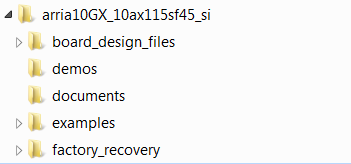 Note: Early-release versions might have slightly different directory names.The table below lists the file directory names and a description of their contents
Table 1. Installed Development Kit Directory Structure File directory Name Description of Contents board_design_files Contains schematics, layout, assembly, and bill of material board design files. Use these files as a starting point for a new prototype board design. demos Contains demonstration applications when available documents Contains the development kit documentation examples Contains the sample design files for the development kit factory_recovery Contains the original data programmed onto the board before shipment. Use this data to restore the board with its original factory contents.