Arria® 10 GX Transceiver Signal Integrity Development Kit User Guide
5.4.3. FPGA Programming over External Intel® FPGA Download Cable
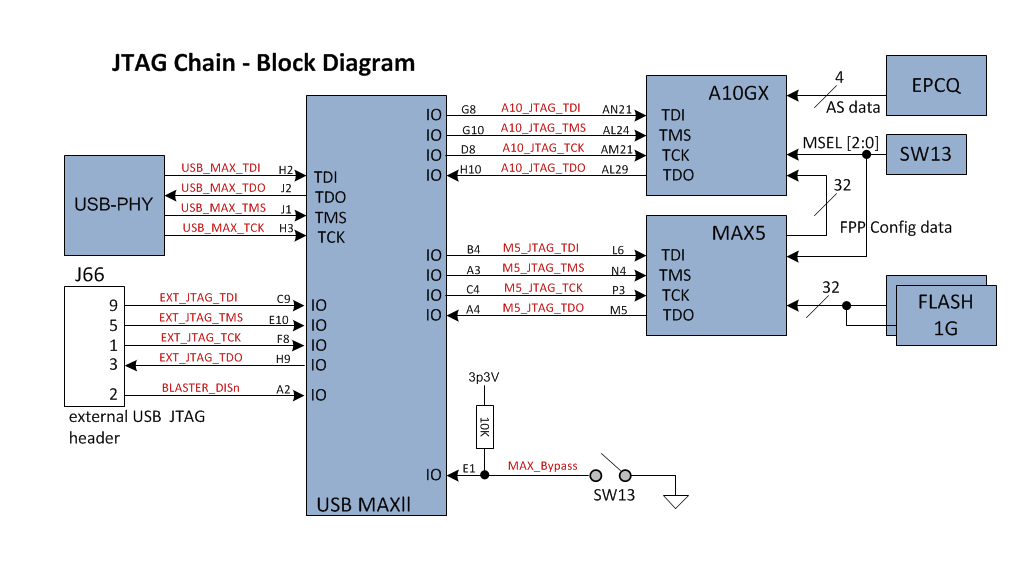
The JTAG chain allows programming of both the Arria® 10 GX FPGA and MAX® V CPLD devices using an external Intel® FPGA Download Cable dongle or the onboard Intel® FPGA Download Cable II via the USB interface connector.
During board bring-up and as a back-up in case the onboard Intel® FPGA Download Cable II has a problem, the external Intel® FPGA Download Cable dongle can be used to program both Arria® 10 GX FPGA and MAX® V CPLD via the external Intel® FPGA Download Cable 2 × 5 pin 0.1" programming header (J66).
Another 2 × 5 pin 0.1" vertical non-shrouded header (J18) is provided on the board for programming the MAXII_Blaster CPLD for configuring the onboard Intel® FPGA Download Cable circuitry. Once the onboard Intel® FPGA Download Cable is configured and operational, the onboard Intel® FPGA Download Cable can be used for subsequent programming of the Arria® 10 GX FPGA and MAX® V CPLD.
- Switch closed— MAX® V is bypassed, only Arria® 10 GX FPGA is in the JTAG chain
- Switch open (Default)–Both MAX® V and Arria® 10 GX FPGA are in the JTAG chain
Pin 2 of the Arria® 10 GX FPGA and MAX® V JTAG Header is used to disable the embedded Intel® FPGA Download Cable by connecting it to the embedded Intel® FPGA Download Cable's DEVOEn pin with a pull-up resistor. Since Pin 2 from the mating Intel® FPGA Download Cable dongle is GND, when the dongle is connected into the JTAG header, the embedded Intel® FPGA Download Cable is disabled to avoid contention with the external Intel® FPGA Download Cable dongle.