Arria® 10 GX Transceiver Signal Integrity Development Kit User Guide
ID
683553
Date
12/01/2025
Public
1. About This Development Kit
2. Getting Started
3. Development Board Setup
4. Board Update Portal
5. Board Components
6. Board Test System
7. Document Revision History for the Arria® 10 GX Transceiver Signal Integrity Development Kit User Guide
A. Programming the Flash Memory Device
B. Safety and Regulatory Compliance Information
A.1. CFI Flash Memory Map
A.2. Preparing Design Files for Flash Programming
A.3. Creating Flash Files Using the Nios® II EDS
A.4. Programming Flash Memory Using the Board Update Portal
A.5. Programming Flash Memory Using the Nios II EDS
A.6. Restoring the Flash Device to the Factory Settings
A.7. Restoring the MAX® V CPLD to the Factory Settings
5.4.1. FPGA Programming over Embedded Intel® FPGA Download Cable
The figure below shows the high-level conceptual block diagram for the embedded Intel® FPGA Download Cable.
Figure 4. Intel® FPGA Download Cable Conceptual Block Diagram
The figure below shows a more detailed schematic block diagram for the embedded Intel® FPGA Download Cable interfacing to the Arria® 10 GX FPGA device.
Figure 5. Detailed Intel® FPGA Download Cable to FPGA Schematic
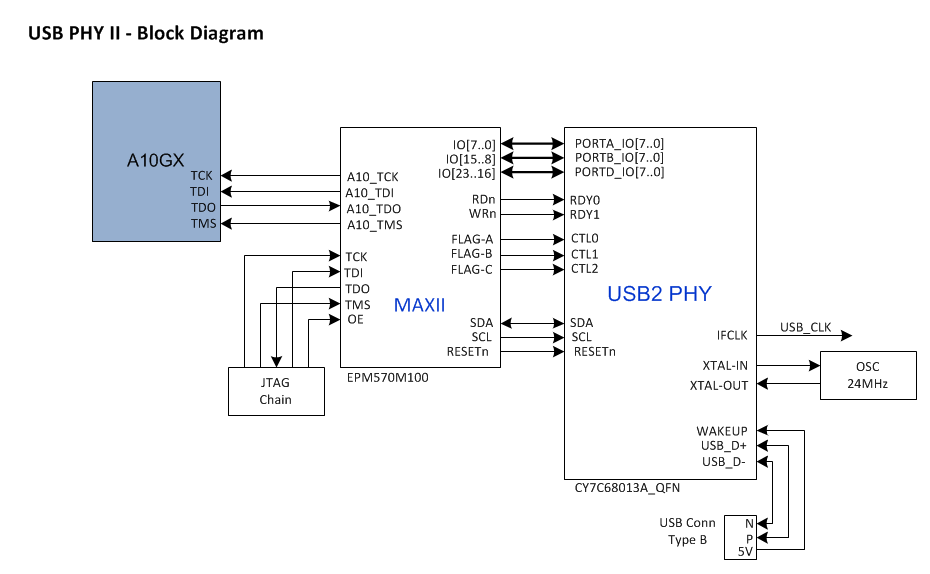
The embedded Intel® FPGA Download Cable core for USB-based configuration of the Arria® 10 GX FPGA device is implemented using a TYPE B USB connector, a CY7C68013A USB2 PHY device, and a MAX® II EPM570M100 CPLD. This allows the configuration of the Arria® 10 GX FPGA device using a USB cable directly connected to a PC running Quartus® Prime software without requiring the external Intel® FPGA Download Cable dongle. This design will convert USB data to interface with the Arria® 10 GX FPGA’s dedicated JTAG port. An LED (D4) is provided to indicate Intel® FPGA Download Cable activity. The embedded Intel® FPGA Download Cable is automatically disabled when an external Intel® FPGA Download Cable dongle is connected to the JTAG chain.