|
|
|
About Assignments |
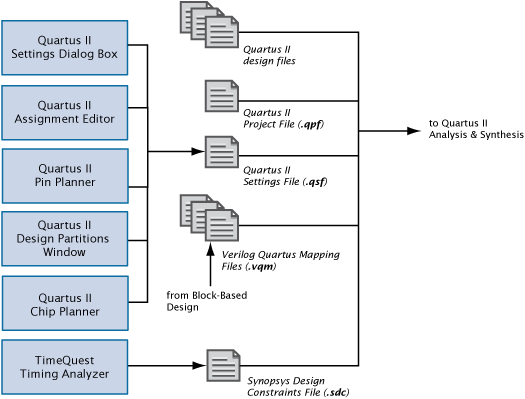
Assignments control a variety of different functions of the Quartus II software and are an important part of an efficient and effective design. When used in conjunction with a good design practices, assignments can help you successfully compile your design. You can create assignments with different editors and dialog boxes in the Quartus II software or with Tcl scripts. Assignments are logic functions you assign to a physical resource on the device, or compilation resources you assign to logic functions.
 About
Analysis & Synthesis Assignments
About
Analysis & Synthesis Assignments
|
Note: To improve performance of the Quartus II software GUI, on the Processing page of the Options dialog box, turn on the Update assignments to disk during design processing only (reccomended to speed up Quartus II interface) option.
If you turn this option on, the Quartus II software updates the Quartus II Settings File (.qsf) only when you perform a processing task, for example, when you start a full compilation. Turning this option on accelerates the Quartus II user interface by minimizing the occurrences of writing to the Quartus II Settings File. This option is turned on by default. |


 Assignments
Flow:
Assignments
Flow: