|
|
|
|
|
|
About Incremental Compilation |
|
The Quartus II incremental compilation feature supports various design flows. In a standard incremental compilation flow, the top-level design is divided into design partitions, which can then be compiled and optimized together in a single Quartus II project. Throughout the development cycle, you can preserve satisfactory compilation results and performance of unchanged partitions to reduce design iteration time by focusing subsequent compilations on partitions in the design that change. Incremental compilation is useful for designs where you want to focus on developing certain partitions of the design while preserving performance from a previous compilation in other partitions. For example, you can use incremental compilation to achieve timing closure for a particular partition that does not meet timing requirements, while preserving the compilation results for partitions that have met design requirements. The incremental compilation design flow reduces design iteration time by an average of 75% for large design changes, allowing you to perform design iterations more quickly. The incremental compilation feature is turned on by default in the Quartus II software.
In a team-based incremental compilation design flow, a team member or IP provider can develop the source code for a partition in the top-level design, and then functionally verify their partition independently in a separate Quartus II project. When the team member or IP provider completes their work, they can then export their partition with the Quartus II Exported Partition File (.qxp) with either post-synthesis or post-fit results. The project lead can use the Quartus II Exported Partition File to integrate the exported partition into the top-level design.
|
|
Note: For more information about how to use incremental compilation when there is more than one designer working in the top-level design, such as when a third-party designer is delivering IP, refer to About Team-Based Incremental Compilation Design Flows. |
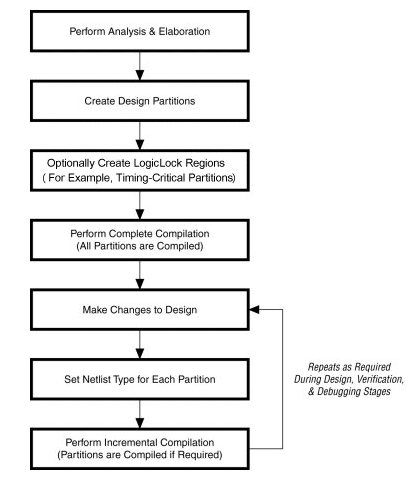
To prepare your design for an incremental compilation flow, you must first perform Analysis & Elaboration in order to identify the hierarchical entities in your design. You can then create design partitions from entities with options in the Project Navigator, Design Partitions window, or Design Partition Planner. When you set a design entity as a partition, hierarchical entities below are also assigned to that partition. By default, the Quartus II software designates the top-level entity as a design partition. A design entity designated as a partition appears with a partition icon ( ) in the Hierarchy tab in the Project Navigator, and also appears in the Design Partitions window.
You can use LogicLock regions to create a floorplan for your design; assigning a particular partition in your design to a specific location on the target device. Floorplan location planning can be important for a design that uses incremental compilation to avoid resource conflicts between partitions. When integrating partitions exported from another Quartus II project, floorplanning helps to ensure a good quality of results when recompiling individual timing-critical partitions. Floorplan assignments are not required for non-critical partitions. Design partitions that cross partition boundaries can be placed independently because cross-partition paths are not critical-timing paths in the design.
|
|
For guidelines and design examples on how to effectively partition your design, and when floorplanning can benefit your design, refer to the Best Practices for Incremental Compilation Partitions and Floorplan Assignments chapter in volume 1 of the Quartus II Handbook. |
 Incremental Compilation Design Flow Diagram:
Design Partitions and Physical Regions:
Timing-Critical Paths and Cross-Boundary Optimizations:
Incremental Compilation Tools and Design Guidelines:
Displaying Messages from Different Partitions:
Working with the SignalTap II Logic Analyzer and SignalProbe Pins:
|
|
For more information about Incremental Compilation, refer to the Altera Training page of the Altera website. |