"Unsupported/ Missing Component/ Connection Failure" Message While Opening Intel® Application Optimization User Interface
Content Type: Error Messages | Article ID: 000102684 | Last Reviewed: 06/09/2026
Intel® Application Optimization user interface Unsupported/ Missing Component/ Connection Failure message may appear while trying to open the user interface. The message content may vary depending on the issue detected. This is likely due to an Intel® Application Optimization component that is unavailable or disabled.
Visual examples for an Unsupported/ Missing Component/ Connection Failure (details may vary):
Follow the steps below to resolve your Unsupported / Missing Component/ Connection Failure message:
|
Processors | Resolution | ||
|
Newer processors:
|
| ||
|
Older processors (limited support):
|
|
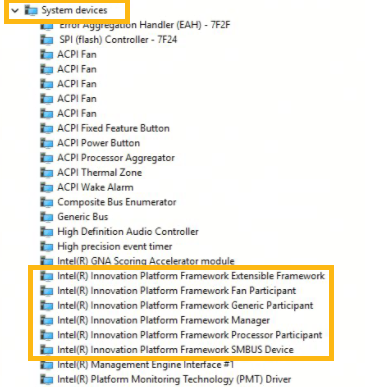
How to verify Intel® Innovation Platform Framework (Intel® IPF or Intel® DTT) is installed and enabled:
Check Intel® Innovation Platform Framework or Intel® Dynamic Tuning Technology drivers in Windows* Device Manager under System devices (see the example below).