Skip To Main Content
Support Knowledge Base

How to Identify My Intel® Processor

Content Type: Identify My Product   |   Article ID: 000006059   |   Last Reviewed: 09/09/2026

There are several ways to identify your Intel® processor. Select the method that matches your operating system or needs.

The methods below apply on all Intel® processors such as Intel® Core™ Ultra, Intel® Core™, Intel® Xeon®, Intel® Pentium®, Intel® Celeron®, and Intel Atom® processors.

Operating System Windows*

Use one of the following methods to identify your processor.

Windows* Method 1: System Information (Recommended)

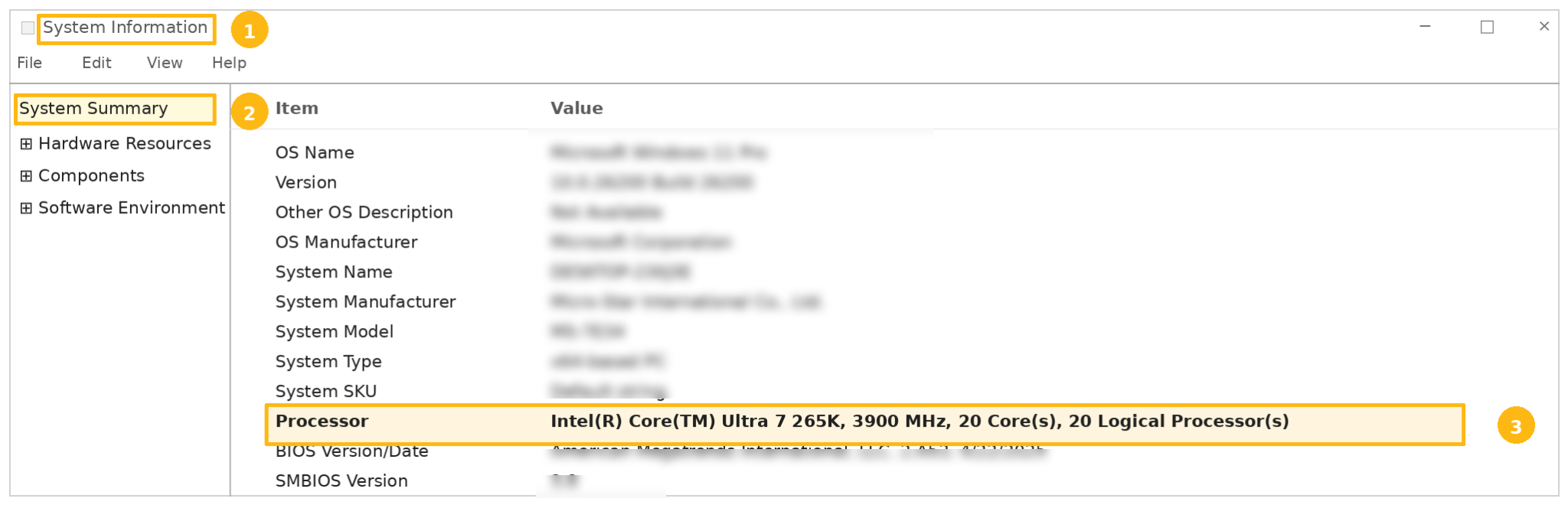
  1. Press Windows Key + R.
  2. Type msinfo32 and press Enter.
  3. In System Summary, locate Processor. Your processor name and model number will be displayed.

System Information window showing Processor field: Intel® Core™ Ultra 7 265K.
Example image-1

Collapsible Section Title

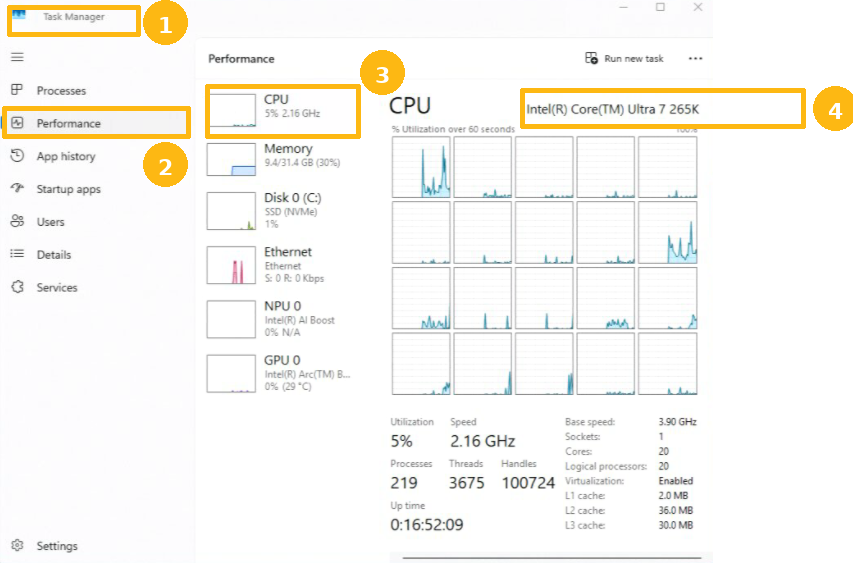
Windows* Method 2: Task Manager
  1. Press Ctrl + Shift + Esc to open Task Manager.
  2. Select the Performance tab.
  3. Select CPU.

The processor name appears at the top of the page: Intel® Core™ Ultra 7 265K.

Example image-2

Linux*
Open a terminal and run the following command: lscpu | grep "Model name".
See example in image below:
Example image-3
macOS*

Applicable to Intel-based Mac systems only.

  • Select the Apple menu (top left corner of your screen).
  • Click About This Mac.

The processor information is displayed in the Overview section.
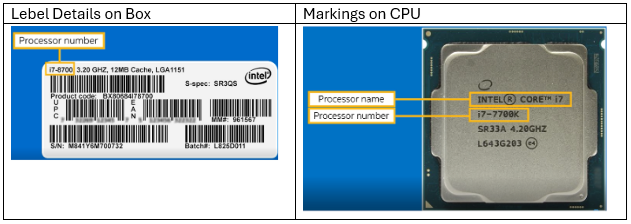
Identify Your Processor Using Box Labels or Processor MarkingsIf the processor is not installed in a system, you can identify it using the markings printed directly on the processor or printed label on the box.
Example image-4
Intel® Processor Identification Utility (Download and Install)
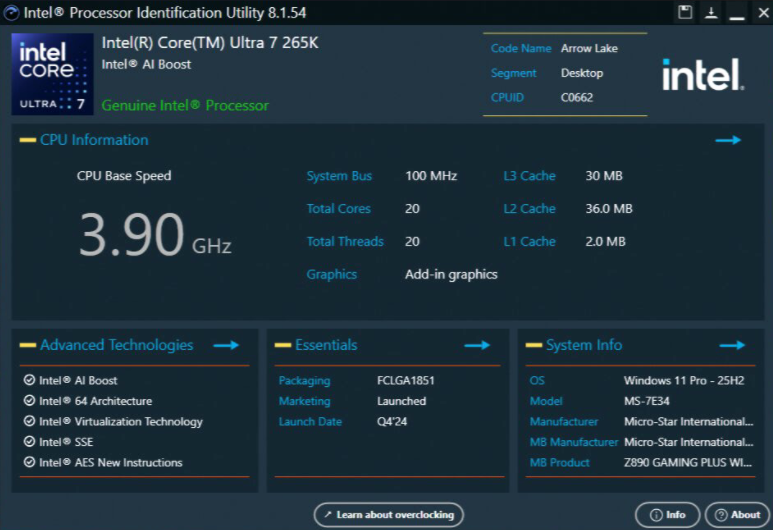
The Intel® Processor Identification Utility automatically identifies your processor and displays detailed information about your system.

The utility can display:

  • Processor name and model
  • Number of cores and threads
  • Processor frequencies
  • Supported technologies
  • Processor specifications
Note
  • Supports Intel® Core™ 7th Generation processors and newer.
  • Available for Windows* systems.
  • Internet access is required for the initial installation.

For more information, see Overview of the Intel® Processor Identification Utility

Example image-5

Video Tutorial

Watch this video to see how to identify your Intel® Processor name and number.


To identify your Intel® Xeon® using the markings on the processor, refer to How to Identify My Intel® Xeon® Processor Markings for Warranty Requests.

Note

Related Products

This article applies to 88 products.
Intel® Core™ i7 processors (14th gen) 5th Generation Intel® Core™ i7 Processors Intel® Celeron® Processor 3000 Series 6th Generation Intel® Core™ i5 Processors Intel® Pentium® Silver Processor Series 9th Generation Intel® Core™ i5 Processors 11th Generation Intel® Core™ i7 Processors 12th Generation Intel® Core™ i3 Processors Intel® Core™ i5 processors (14th gen) Intel® Celeron® Processor J Series 8th Generation Intel® Core™ m Processors Intel Atom® Processor Z Series Intel® Celeron® Processor J1900 (2M Cache, up to 2.42 GHz) Intel Atom® Processor E Series 9th Generation Intel® Core™ i3 Processors Intel® Pentium® Processor D Series 13th Generation Intel® Core™ i3 Processors Intel® Core™ processors (Series 3) Intel® Pentium® Processor 4000 Series Intel Atom® Processor N Series Intel Atom® Processor X Series Intel® Pentium® Processor 2000 Series 13th Generation Intel® Core™ i7 Processors 9th Generation Intel® Core™ i7 Processors 7th Generation Intel® Core™ i7 Processors Intel® Pentium® Processor N Series Intel® Pentium® Processor 3000 Series Intel® Pentium® Processor G Series 4th Generation Intel® Core™ i3 Processors Intel® Celeron® Processor N Series Intel® Pentium® Gold Processor Series 11th Generation Intel® Core™ i3 Processors Intel® Celeron® Processor 1000 Series Intel® Processor for Desktop Intel® Core™ X-series Processors Intel® Core™ processors (Series 1) 11th Generation Intel® Core™ i5 Processors 12th Generation Intel® Core™ i7 Processors 12th Generation Intel® Core™ i5 Processors 12th Generation Intel® Core™ i9 Processors 7th Generation Intel® Core™ m Processors 5th Generation Intel® Core™ i5 Processors Intel® Celeron® Processor 2000 Series Intel® Processor N-series 9th Generation Intel® Core™ i9 Processors 8th Generation Intel® Core™ i7 Processors 10th Generation Intel® Core™ i9 Processors Intel® Pentium® Processor N4200 (2M Cache, up to 2.50 GHz) Intel® Celeron® Processor J3455 (2M Cache, up to 2.30 GHz) 8th Generation Intel® Core™ i9 Processors 10th Generation Intel® Core™ i7 Processors 7th Generation Intel® Core™ i5 Processors 6th Generation Intel® Core™ i7 Processors Intel® Processor U-series 4th Generation Intel® Core™ i7 Processors Intel® Celeron® Processor 5000 Series Intel® Core™ i3 processors (14th gen) Intel® Core™ Ultra Series 3 processors Intel® Core™ processors (Series 2) 8th Generation Intel® Core™ i3 Processors 6th Generation Intel® Core™ m Processors Intel® Celeron® Processor G Series 5th Generation Intel® Core™ M Processors Intel® Pentium® Processor J Series 13th Generation Intel® Core™ i5 Processors 13th Generation Intel® Core™ i9 Processors Intel® Core™ Ultra Processors (Series 2) Intel® Core™ i9 processors (14th gen) Intel® Celeron® Processor J3355 (2M Cache, up to 2.50 GHz) 10th Generation Intel® Core™ i5 Processors 11th Generation Intel® Core™ i9 Processors Intel® Core™ Ultra Processors (Series 1) 8th Generation Intel® Core™ i5 Processors 7th Generation Intel® Core™ i3 Processors Intel® Pentium® Processor 1000 Series Intel Atom® Processor C Series 4th Generation Intel® Core™ i5 Processors 6th Generation Intel® Core™ i3 Processors 10th Generation Intel® Core™ i3 Processors Intel® Celeron® Processor 4000 Series Intel Atom® Processor S Series Intel® Core™ Processor N-series 5th Generation Intel® Core™ i3 Processors

Discontinued Products