
|
|
|
About Programming |
The Quartus II Programmer allows you to configure an Altera FPGA or CPLD device with a design. You use the Quartus II software to generate programming files that represent your design, and then use the Programmer to download the programming files to an Altera device over Altera programming hardware. You can also use the Programmer to program a flash memory device, which can then program or reprogram an Altera FPGA.

 Basic
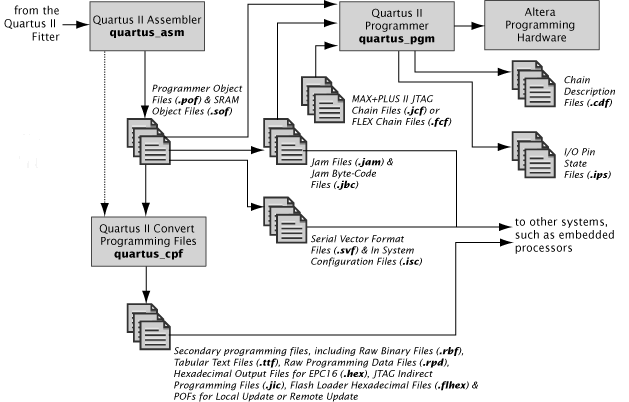
Programming Flow Diagram:
Basic
Programming Flow Diagram:
Programmer Setup Files
When you set up the Programmer, it stores programming options for your design in a Chain Description File (.cdf). You can use the Programmer to specify the following options preserved in the .cdf:
Programming hardware setup
Programming mode
Programming files and their properties
Target device list, including user-defined devices
Order of devices and files in a multidevice chain
Create or edit I/O Pin State Files (.ips), and add, replace, or delete them in the IPS File list.
Device Programming Files
During design compilation, the Quartus II software generates an SRAM Object File (.sof) or a Programmer Object File (.pof) required for device programming. Use .sof files to configure Altera FPGA devices, and .pof to configure Altera CPLDs. You can also generate other programming files with the Device and Pin Options dialog box.
The Programmer has four programming modes:
In Passive Serial programming mode, you can select which SRAM Object Files (.sof) to include in the device chain. You can program an SRAM device with Raw Binary File (.rbf) data via the Passive Serial configuration scheme. You cannot add Programmer Object Files to Chain Description Files (.cdf), or select Programmer Object Files to replace programming files in a Chain Description File, when using Passive Serial programming mode.
In JTAG programming mode, you can add specific devices to the device chain; add a Jam File (.jam) or Jam Byte Code File (.jbc) to the File list; add SRAM Object Files or Programmer Object Files to the Files list; and select between several programming options for each device and programming file in the chain. This mode also allows you to program a parallel configuration device with Programmer Object File (.pof) data via the Parallel Flash Loader and the JTAG interface. Additionally, you can choose to display the checksum without usercode in JTAG programming mode or to initiate configuration of attached devices after programming a configuration device by changing Programmer options. In JTAG programming mode, you can define or edit user-defined devices and add them to the device chain. You can also import or export user-defined devices. You can only program PFLs in JTAG programming mode.
In Active Serial programming mode, you can program a single serial configuration device(EPCS1, EPCS4, EPCS16, EPCS64, EPCS128 or EPCS256) with a Programmer Object File for supported device(Cyclone III or Stratix III) families. All the programming options available for devices in JTAG programming mode, except Security Bit, are also available when using Active Serial Programming mode. The Active Serial programming mode allows you to program a single serial configuration device(EPCS1, EPCS4, EPCS16, EPCS64, EPCS128, or EPCS256) using the download cable.
|
Note: An FPGA device is a volatile device. It uses the active serial interface to configure it. By contrast, an active serial configuration device is a non-volatile device. It uses the active serial interface to program it with a header file. |
In In-Socket programming mode, you can program a single configuration device with a Programmer Object File, Jam File, or Jam Byte Code File. The programming options available for devices in JTAG programming mode are also available when using In-Socket programming mode. Additionally, you can choose to display the checksum without usercode in In-Socket programming mode or to initiate configuration of attached devices after programming a configuration device by changing Programmer options. In addition, you can turn on the Erase option if you wish to erase the contents of CPLD devices. The In-Socket programming mode allows you to program a single device with a Chain Description File and the Altera Programming Unit (APU). You can also add remote JTAG servers so that you can use programming hardware that is not available on your computer, and configure local JTAG server settings so remote users can connect to your local JTAG server.
Both Passive Serial and JTAG programming modes allow you to program single or multiple devices with a Chain Description File and the download cable.(ByteBlasterMV, ByteBlaster II, EthernetBlaster, or USB-Blaster) You can change the download cable options by changing the hardware setup for each Chain Description File that you open in Passive Serial or JTAG mode in the Programmer.
You can edit multiple JTAG or Passive Serial chains at the same time in open Programmer windows, but you can program only one chain at a time. You can also edit multiple instances of single devices at the same time in open Programmer windows when using In-Socket Programming mode or Active Serial Programming mode, but you can program only one device at a time. You can program or configure a single device in a multidevice mode, but you must specify a single device and programming file as the contents of the chain.
You can add devices only while using JTAG, In-Socket, or Active Serial programming modes. You can add a device to a chain for one of the following reasons:
You can add a device to bypass it (that is, pass without performing any programming action on it). You are permitted to add any device from the Select Devices dialog box for bypassing purposes. When you add such a device to the chain, all programming options—Program/Configure, Verify, Blank-Check, Examine, and Security Bit—which are located in the programming list, are unavailable.
You can add a configuration device to blank-check, examine, or bypass it. When you add a configuration device to the chain, you can turn on the programming options Blank-Check or Examine. The remaining programming options are not available. If you do not turn on Blank-Check or Examine, the configuration device is bypassed. You can examine only one configuration device at a time, and turning on Examine disables all the options for the rest of the devices and configuration devices in the chain.
You can add a MAX II device to blank-check, examine, or bypass it, or to turn on the security bit for it. When you add a MAX II device to the chain, you can turn on the programming options, Blank-Check, Examine, or Security Bit. The remaining programming options are not available. If you do not turn on Blank-Check, Examine, or Security Bit, the MAX II device is bypassed. You can examine only one MAX II device at a time, and turning on Examine disables all the options for the rest of the devices and configuration devices in the chain.
The following describes programming options that are available in different programming modes:
In Active Serial programming mode, all programming options except Security Bit are available for the single EPCS1 or EPCS4 serial configuration device.
In Passive Serial programming mode, all programming options are unavailable.
When using In-Socket programming mode, all programming options are available for the single configuration device.
If you do not select an option for a particular device in the chain, the Programmer performs no action on that device during programming or configuration.
 About
Optional Programming Files
About
Optional Programming Files
|
Note: You can use the stand-alone version of the Programmer to configure Altera devices without running the Quartus II software. |
|
More information is available about Programming on the Altera website. |
Copyright© 2005-2014 Altera Corporation. All rights reserved. ALTERA, ARRIA, CYCLONE, MAX, MEGACORE, NIOS, QUARTUS, STRATIX, and all other brands, unless noted otherwise, and/or trademarks of Altera Corporation in the U.S. and other countries.


