Intel® Integrated Performance Primitives (Intel® IPP) Developer Guide and Reference
Trilinear Interpolation
The trilinear interpolation is slower but more accurate than the 3D neighbor interpolation. It is also faster but less accurate than the tricubic interpolation. The trilinear interpolation algorithm uses source image intensities at the eight pixels: (x s0, y s0, z s0), (x s0, y s0, z s1), (x s0, y s1, z s0), (x s0, y s1, z s1), (x s1, y s0, z s0), (x s1, y s0, z s1), (x s1, y s1, z s0), (x s1, y s1, z s1) that are the closest to (x s, y s, z s) in the source image:

also with the conditions:
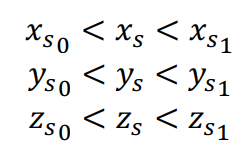
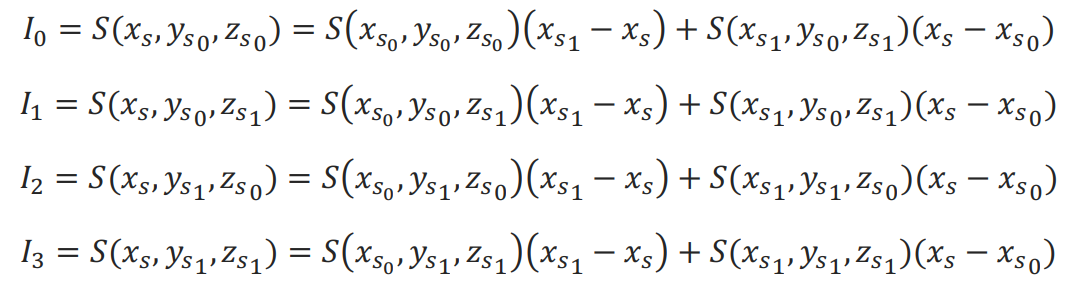
First, the intensity values are interpolated along the x-axis to produce four intermediate results I 0, I 1, I 2, I 3 :
Second, the intensity values are interpolated along the y-axis using the intermediate value I 0, I 1, I 2, I 3:
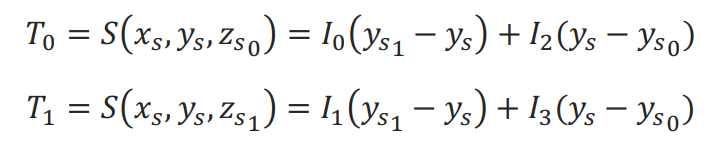
Then, the sought-for intensity D(x D, y D, z D) = T 0 (z s1-z s) + T 1 (z s-z s0)
To use the linear interpolation, set the interpolation parameter to IPPI_INTER_LINEAR or use the functions with the Linear suffix (pass interpolation = ippLinear to GetSize functions).
To visualize the operation of the algorithm, look at the Linear interpolation page .