|
|
|
About the Netlist Viewers |
The RTL Viewer, State Machine Viewer, and Technology Map Viewer allow you to view schematic representations of the internal structure of your designs. Each viewer displays a unique view of the netlist, and allows you to view different internal structures.
The RTL Viewer allows you to view a schematic of the design netlist after Analysis & Elaboration and netlist extraction, but before Quartus II synthesis and fitting optimizations. This view is not the final structure of the design, because not all optimizations are included; instead it is the closest possible view to the original design. If the design uses integrated synthesis, this view shows how the Quartus II software interprets the design files; if you are using a third-party EDA synthesis tool, this view shows the netlist as written by the EDA synthesis tool. When processing the netlist, the RTL Viewer automatically performs the following optimizations:
You can view Analysis & Elaboration results when the design uses Verilog Design Files (.v), VHDL Design Files (.vhd), Text Design Files (.tdf), or Block Design Files (.bdf). You can view the hierarchy of atom primitives, such as device logic cells and I/O ports, when the design uses a third-party EDA synthesis tool to generate a Verilog Quartus Mapping File (.vqm) or EDIF Input File (.edf) netlist file.
The Technology Map Viewer allows you to view a low-level, technology-specific schematic of the design netlist after fitting or after Analysis & Synthesis. You can access the post-fitting view of the schematic with the Technology Map Viewer ( Post Fitting) command; or you can access the post-mapping view of the schematic, regardless of the synthesis tool you use, with the Technology Map Viewer (Post-Mapping) command. When opened from a timing path in the Timing Analyzer report, the Technology Map Viewer also displays detailed timing delay information for the timing path.
In the RTL Viewer and Technology Map Viewer, you can search the design netlist in the Find pane. You can view the properties of a selected entity in the Properties pane.
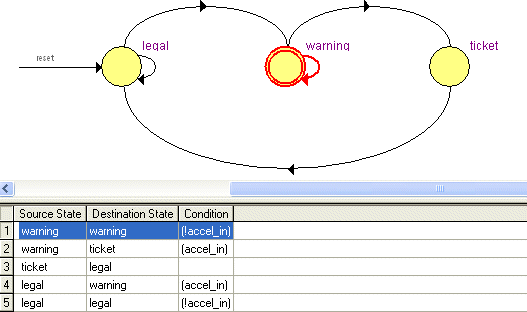
The State Machine Viewer provides a high-level view of finite state
machines in the design and displays the internal structure of state machines
in the design, including a more detailed view of the fan-in and fan-out
of individual state nodes. The State Machine Viewer also displays the
node transitions in table format.
|
Note: If you want to create an original state machine diagram, you can use the State Machine Editor. |
 RTL
Viewer and Technology Map Viewer User Interface and Functionality:
RTL
Viewer and Technology Map Viewer User Interface and Functionality:
State
Machine Viewer User Interface and Functionality:
Application
of Netlist Viewers:
|
Important: To open the RTL Viewer, you must perform at least Analysis & Elaboration on the design.To open the Technology Map Viewer, you must perform at least Analysis & Synthesis on the design to view the post-mapping view of the netlist. To view the post-fitting view of the netlist, you must perform a full compilation. |