
|
|
|
|
|
|
Understanding Assignment Priority |
|
Assignment of a node or design entity to a LogicLock region can cause conflicts with other assignments. The Quartus II software applies a number of rules to resolve these potential conflicts.

 Assigning Entities and Nodes to LogicLock Regions:
When you assign an entity to a LogicLock region, the assignment is inherited by all lower-level entities and nodes contained in that entity. If you assign an entity to a LogicLock region and assign one of its sub-entities or nodes to another LogicLock region, the more specific assignment on the sub-entity or node overrides the inherited assignment. For example, if you assign entity filter to LogicLock region LLR_0 and sub-entity filter|adder:my_adder to LogicLock region LLR_1, the sub-entity is placed in LLR_1, and all other sub-entities and nodes in filter are placed in LLR_0.
Some assignments in the Quartus II software take precedence over LogicLock region assignments. When a node or entity has both a LogicLock region assignment and another assignment with a higher precedence, the Fitter ignores the LogicLock region assignment and produces a warning message. Types of assignments that take precedence over LogicLock region assignments include location assignments and Fast Input Register, Fast Output Register, and Fast Output Enable Register logic options. The Fitter can ignore LogicLock region assignments on nodes or entities that require special physical resources, such as regional clocks, or pins with particular I/O standards.
LogicLock region assignments take precedence over the Optimize IOC Register Placement for Timing option available in the More Fitter Settings dialog box. However, for supported device (Arria series, Cyclone series, MAX II, MAX V, and Stratix series) families, in the case of locked LogicLock regions that extend onto pins, the Fitter attempts to honor both the LogicLock region assignment and the Optimize IOC Register Placement for Timing option.
Assigning Pins to LogicLoc Regions:
If you assign a pin to a LogicLock region (for example, by selecting the pin name in the Node Finder and assigning it to the LogicLock region), the Fitter honors the assignment only if the region and all its parent LogicLock regions have locked locations. In this case, the Fitter attempts to place the pin inside the LogicLock region.
Assigning Carry Chains, Cascade Chains, and Cliques to LogicLock Regions:
Carry chains, cascade chains, and cliques cannot cross LogicLock region boundaries. If you assign some nodes in a carry chain, cascade chain, or clique to a parent LogicLock region and other nodes in the same chain or clique to descendant LogicLock regions along a single branch of the LogicLock region hierarchy, the Fitter places all nodes in the chain or clique inside the lowest-level LogicLock region to which nodes in the chain or clique are assigned. In all other cases when nodes in the same chain or clique are assigned to different LogicLock regions, the Fitter produces an error message.
Assigning Partitions to LogicLock Regions:
If you assign a partition to a LogicLock region, it is important to consider that the Netlist Type setting (as set in the Design Partitions window) of the partition determines whether assignment changes are implemented in the next compilation. The Fitter implements LogicLock region changes if the assigned partition has a Fitter Preservation Level of Netlist Only, or if the partition does not re-use previous fitting results (for example, if the Netlist Type of the partition is set to Post-Synthesis). When the partition does not re-use previous fitting results, the GUI displays the Fitter Preservation Level as Not Applicable. The Fitter usually ignores changes if the assigned partition has a Fitter Preservation Level of Placement; Placement and Routing; or Placement, Routing, and High-Speed Tiles. There are, however, some exceptions:
If you specify a new LogicLock region Origin, the Fitter moves the LogicLock region to the new Origin, preserving the relative placement of the member logic within the region.
If you set the LogicLock region State to Floating, whether the Fitter moves the LogicLock region depends on whether the partition is imported or not.
If the partition is not imported and the Netlist Type is Post-Fit, the Fitter ignores the Floating State, and does not move the LogicLock region. The Fitter uses the previous compilation's placement of the LogicLock region.
If the partition is imported and the Netlist Type is Post-Fit, the Fitter determines a new Origin and moves the LogicLock region to it, preserving the relative placement of the member logic within the region.
If a single LogicLock region (or LogicLock region hierarchy) contains more than one partition (or nodes from more than one partition) that have different NetList Type or Fitter Preservation Level settings, the Quartus II software determines whether to implement, during the next compliation, changes you made after the previous compilation by applying the following priority:
Highest priority—LogicLock region contains at least one member from an imported partition and whose Fitter Preservation Level is Placement or Placement and Routing. Changes to the LogicLock region are not implemented, except new Origin settings and re-placement of a LogicLock region with State set to Floating.
Second priority—LogicLock region contains at least one member from a partition whose Netlist Type is Post-Fit and Fitter Preservation Level is Placement or Placement and Routing. Changes to the LogicLock region are not implemented, except new Origin settings.
Lowest priority— Fitter Preservation Level is Netlist Only or Not Applicable. Changes to the LogicLock region are implemented.
|
|
Important: Altera recommends that you do not assign members from multiple partitions with different Netlist Type or Fitter Preservation Level settings to a single LogicLock region or to a single LogicLock region hierarchy. |
Understanding Priority of Wildcard LogicLock Region Membership Assignments:
You can create conflicting membership assignments between LogicLock regions with wildcard assignments. To avoid this, the Quartus II software prioritizes assignments as follows:
Highest priority— node assignments
Second priority— wildcard assignments
Lowest priority— entity assignments
These rules of precedence are applied in a manner analogous to the rules of algebra. Just as the rules of algebra specify that multiplication operations are performed before addition operations, these rules specify that node assignments be applied before wildcard or entity assignments. Similarly, wildcard assignments are applied before entity assignments.
Example:
The following example illustrates how priorities are determined. Consider a project with the following compilation hierarchy:
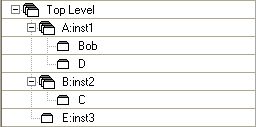
Assume the following node, wildcard, and entity assignments:
|
Assignment |
LogicLock region |
|
Top Level |
Region_1 |
|
*B* |
Region_2 |
|
Top|B:inst2|C |
Region_3 |
The above assignments result in the regions being populated as follows:
|
Region_1 |
Region_2 |
Region_3 |
|
|
|
|
|
|
|
|
Understanding Priorities with Multiple Wildcard LogicLock Region Membership Assignments:
While the relative priority of node assignments and entity assignments is clear (node assignments take precedence), the relative priority between multiple wildcard assignments can be ambiguous.
Example:
Consider the node a:inst1|mynode.
An assignment made to a:inst1 would apply to the above node, as would an assignment made to a:inst1|mynode; however, the a:inst1|mynode assignment takes priority because it is the more specific assignment.
If you make a wildcard assignment to a*, the order of precedence is as follows:
Highest priority— a:inst1|mynode
Second priority— a*
Lowest priority— a:inst1
However, if you make a second wildcard assignment, * mynode, the intended order of priority is ambiguous, as the two wildcard assignments seem to have equal priority:
Highest priority— a:inst1|mynode
Second priority— a* or * mynode
Lowest priority— a:inst1
The Quartus II software manages such potential conflicts by applying the LogicLock Region Priority parameter when you create wildcard or path-based assignments. The LogicLock Region Priority parameter automatically assigns a number, establishing the wildcard or path-based assignment's relative priority. The Quartus II software automatically assigns the highest priority to the most recently created assignment. Hence, in the above example, * mynode would take precedence over a*, resulting in the following order of precedence:
Highest priority— a:inst1|mynode
Second priority— * mynode
Third priority— a*
Lowest priority— a:inst1
The Quartus II software inserts the LogicLock Region Priority parameter when you create assignments with the set_logiclock_contents Tcl command, with the LogicLock Region Properties dialog box, or by dragging and dropping a resource into a LogicLock region.
|
|
Notes:
The Quartus II software does not insert the LogicLock Region Priority parameter for assignments created with the Assignment Editor.
You should never attempt to apply LogicLock Region Priority parameters manually, such as with a set_instance_assignment statement. |

Copyright© 2005-2014 Altera Corporation. All rights reserved. ALTERA, ARRIA, CYCLONE, MAX, MEGACORE, NIOS, QUARTUS, STRATIX, and all other brands, unless noted otherwise, and/or trademarks of Altera Corporation in the U.S. and other countries.


