This problem may be seen in the Quartus® Prime Pro Edition Software version 23.3 when adding the Nios® II/f processor core Node into SignalTap Logic Analyzer using the Nios® II Plug-In.
Error message: The Add Nodes with Plug-In command could not be completed because the selected IP could not be found in the current design.
This is due to a software problem in the Nios® II Plug-In.
1. Add SignalTap nodes with the following instruction trace,
- *|cpu|F_pc[N:0]
- *|cpu|D_iw[31:0]
- *|cpu|W_valid
2. Apply the trigger condition based on the objdump file.
The objdump file presents the instructions using the following format,
<Address>: <Opcode> <Assembly Mnemonic>
- *|cpu|F_pc[N:0] to Address[N:2]
- *|cpu|D_iw[31:0] to Opcode
- *|cpu|W_valid
For example,
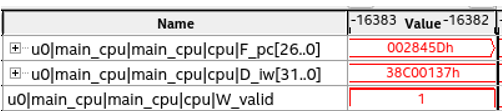
a1174: 38c00137 ldwio r3,4(r7)
- *|cpu|F_pc[26:0] to 0x2845D
- *|cpu|D_iw[31:0] to 0x38c00137
- *|cpu|W_valid
3. Analyze the instruction trace to the software image objdump file.
This problem is currently scheduled to be resolved in a future release of Intel® Quartus® Prime Pro Edition Software.
Refer to Debugging Nios® II Systems with the SignalTap II Embedded Logic Analyzer Application Note for more information on,
- Analyze the instruction trace in the chapter Analyzing Results.
- Apply trigger condition in chapter Specifying Trigger Condition.