Due to a problem in the Intel® Quartus® Prime Pro Edition Software version 22.4 and earlier, simulation does not assert AM_LOCK and RX_PCS_READY for the following configuration of Non-PTP E-Tile Ethernet IP for Intel Agilex® 7 FPGA100GE MAC+PCS with Optional RS-FEC Simulation Design Example. Problem occurs when the sim_mode parameter is modified for E-Tile Hard IP for Ethernet Intel® FPGA IP (non-default value) as follows:
parameter sim_mode = "disable";
Configuration:
- Under the IP tab:
- Set Single 100GE with optional RSFEC or 100GE or 1 to 4 channel 10GE/25GE with optional RSFEC and PTP as the core variant.
- Set 100GE Channel as Active channel(s) at startup if you choose 100GE or 1 to 4 channel 10GE/25GE with optional RSFEC and PTP as the core variant.
- Enable RSFEC to use the RS-FEC feature.
Note: The RS-FEC feature is only available when you select 100GE or 1 to 4 channel 10GE/25GE with optional RSFEC and PTP as the core variant.
- Under the 100GE tab:
- Set 100G as the Ethernet rate.
- Set MAC+PCS as Select Ethernet IP Layers to instantiate MAC and PCS layer or MAC+PCS+(528,514)RSFEC/MAC+PCS+(528,514)RSFEC to instantiate MAC and PCS with RS-FEC feature.
To correctly disable the sim_mode parameter for E-Tile Hard IP for Ethernet Intel® FPGA IP, make the following changes:
For design without AN/LT:
1. Open <example_design_variation_name>\example_testbench\basic_avl_tb_top.sv.
2. After signal declaration, copy and paste the following line:
defparam dut.alt_ehipc3_fm_0.alt_ehipc3_fm_hard_inst.E100GX4_FEC.altera_xcvr_native_inst.xcvr_native_s10_etile_0_example_design_4ln_ptp.generate_RSFEC_block.inst_ct3_hssi_rsfec.ct3_hssi_rsfec_encrypted_inst.ct1_hssirtl_rsfec_wrap_inst.die_specific_inst.x_rsfec_wrap.LOG2_MRK = 10;
For designs with AN/LT:
1. Change Link Fall Inhibit Time value in the IP parameter to 2000 as shown in the following screenshot:
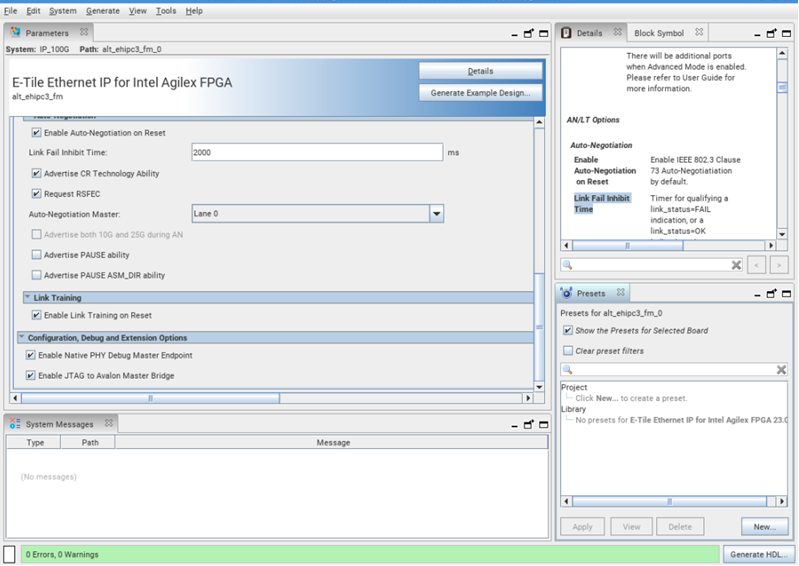
2. Click Generate HDL.
3. Make the changes to <example_design_variation_name>\example_testbench\basic_avl_tb_top.sv as decribed above.
Once the modifications are done, run the simulation as described in the user guide.
This problem is due to be resolved in a future release of the Intel® Quartus® Prime Pro Edition Software.