Skip To Main Content
Support Knowledge Base

Intel® Dynamic Tuning Technology (DTT) Overview

Content Type: Product Information & Documentation   |   Article ID: 000102775   |   Last Reviewed: 04/30/2026

What is Intel® Dynamic Tuning Technology (DTT)?

Intel® Dynamic Tuning Technology intelligently optimizes system performance, power, acoustics, and thermals in real time—so your device delivers performance when you need it and efficiency when you don’t. By continuously monitoring workloads, temperatures, and power conditions, DTT dynamically balances resources across the CPU, GPU, and other platform components. This keeps devices cool, quiet, and responsive while adapting to how you work, game, or create—resulting in a faster, more comfortable computing experience on laptops and other mobile platforms.

DTT is preinstalled on nearly all Intel‑based mobile systems, with adoption on desktop platforms continuing to grow. It provides an open framework that allows OEMs to develop their own differentiated power and thermal management solutions, while also offering Intel‑developed Artificial Intelligence / Machine Learning (AI/ML) ‑based features that can be enabled out of the box. Many DTT features are enabled by default to deliver an optimal first‑use experience. Final feature selection and tuning are determined by the system manufacturer (OEM), allowing each system design to be optimized according to its thermal, acoustic, and performance goals.

DTT is primarily deployed on Windows‑based systems, with additional support available through collaborations with Linux and ChromeOS partners to help deliver a consistent experience across operating systems.

Intel® Dynamic Tuning Technology Capabilities 

Always‑On Thermal Protection

Maintaining safe skin temperatures—typically below ~44 °C on mobile devices—is essential to prevent discomfort and ensure safe operation. Intel® DTT serves as the primary thermal management solution on Intel platforms. DTT continuously monitors device temperatures and applies intelligent cooling policies to keep systems safe, quiet, and comfortable under all workloads. OEMs may implement one or more of the following solutions depending on system design:

  • Smart Fan Control: Dynamically adjusts fan speeds based on real‑time thermal conditions, providing effective cooling without unnecessary noise.
  • Real‑Time Performance Throttling: Smoothly scales performance only when required to prevent overheating, avoiding abrupt changes in responsiveness.
  • Emergency Thermal Safety: Acts as a last line of defense by automatically initiating sleep, hibernate, or safe shutdown if critical temperature thresholds are exceeded.
  • Virtual Temperature Sensing: Uses software‑based modeling and machine‑learning inference to estimate accurate thermal readings on systems with limited physical sensors.
Intelligent Power Management

Not all workloads behave the same. Some demand sustained performance, while others benefit more from efficiency. A static power configuration cannot optimize for all use cases. Intel® DTT analyzes workload behavior in real time and dynamically tunes power and system settings to deliver the best balance of performance, efficiency, acoustics, and battery life. Key capabilities include:

  • Workload‑Aware Tuning: Uses System on Chip (SoC) telemetry and ML‑driven analysis to continuously right‑size power limits based on what the system is doing.
  • Battery‑Aware Power Management: Adjusts behavior based on battery state and power source to maximize usable battery life when it matters the most.
  • Dynamic System Configuration: Responds to platform context, power source, operating mode, and collaboration states to optimize system‑wide behavior.
  • Scenario‑Based Optimization: Automatically tunes the system for scenarios such as gaming, AI workloads, content creation, or video conferencing.
Smart Performance Optimization

Modern workloads—such as gaming, video editing, and AI—depend on more than CPU performance alone. Optimal results require coordinated use of CPU, GPU, memory, and other system components, all of which share finite power and thermal budgets. Intel® DTT detects available power and thermal headroom and dynamically reallocates resources across system components. By intelligently balancing performance constraints, DTT helps ensure that demanding applications receive the right resources at the right time—silently boosting performance without user intervention.

Automated Radio Frequency (RF) Interference Mitigation

Motherboards contain many high‑frequency clocks whose harmonics can interfere with Wi‑Fi and Bluetooth signals, depending on antenna placement. Traditional mitigation methods—such as shielding or RF absorbers—can increase cost and design complexity and may not always be effective. Intel® DTT provides a software‑based RF interference mitigation solution that requires no board redesign. It actively monitors wireless signals and clock sources in real time and adjusts system behavior to reduce interference, improving wireless reliability and performance.

Original Equipment Manufacturer (OEM) Co‑Innovation Made Easy

Every system design requires its own unique value proposition, while OEMs also aim to deliver consistent experience across their product lines. Intel® DTT includes a flexible rules engine that enables OEMs to integrate proprietary innovations without exposing their intellectual property. Major OEMs use DTT to define condition‑based behaviors without requiring BIOS changes—allowing faster development cycles and greater platform differentiation.

High-level Architecture

Intel® DTT is implemented as a user‑mode device driver and relies on the Intel® Innovation Platform Framework (IPF) to communicate with platform devices. A compatible IPF driver is required for proper functionality.
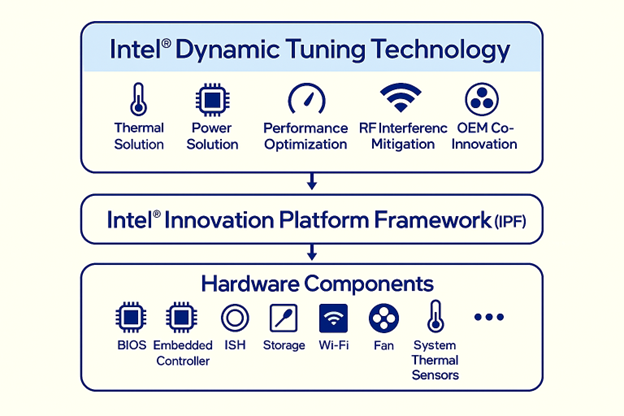
High-level Architecture

Because DTT operates as a platform‑level solution, its capabilities depend on support from system firmware (BIOS/UEFI), embedded controllers, and underlying hardware drivers. Keeping firmware and platform software up to date is essential to ensure uninterrupted DTT operation.

Deployment

Intel® DTT is designed for OEM integration in Intel‑based PC systems. It may be distributed through:

End users cannot manually install or enable DTT unless it is supported and configured by the system manufacturer. Users can upgrade DTT, but they should not be uninstalled or downgraded. Doing so could result in unexpected user experience, such as hot/noisy system with shorter battery life.

Frequently Asked Questions

  1. Is Intel® DTT the same as Intel® DPTF?
    They serve the same purpose but target different generations of platforms:
    • Intel® DPTF: Older framework used on previous Intel platforms
    • Intel® DTT: Newer implementation used on modern Intel® processors

    Both coordinate system‑wide power and thermal behavior using OEM‑defined policies.

  2. Why is Intel® DTT installed automatically?
    Intel® DTT is a required platform component on many systems. It integrates tightly with firmware, thermal sensors, and power controllers to ensure safe and reliable operation. Installation via OEM packages or Windows Update is an expected behavior.
     
  3. Does Intel® DTT have user‑configurable settings?
    No. Intel® DTT does not include a user‑facing interface. Behavior is defined by the system manufacturer and may be influenced indirectly through:
    • BIOS performance modes
    • OEM utilities (e.g., performance or quiet modes)
    • Operating system power plans
       
  4. Why does my CPU throttle under load?
    Temporary performance throttling is normal and intentional. Intel® DTT manages power and thermals to prevent overheating and ensure sustained operations, especially in thin or compact systems.
     
  5. Can Intel® DTT increase fan noise or temperatures?
    DTT may allow short performance boosts for responsiveness, which can briefly increase temperatures or fan activity. This behavior operates within OEM‑defined limits and is not a defect.
     
  6. Can I disable Intel® DTT or DPTF?
    Disabling DTT or DPTF is not recommended unless directed by your system manufacturer. These technologies are part of the platform’s safety and stability design, and disabling them may lead to overheating, reduced battery life, or system instability.
     
  7. Can Intel® DTT cause system crashes?
    Instability is rare and typically related to mismatched BIOS or driver versions. Most issues are resolved by installing the latest OEM‑provided BIOS and drivers rather than generic third‑party versions.
     
  8. Which DTT or DPTF driver should I install?
    Always use the driver provided by your system or motherboard manufacturer. OEM drivers may include platform‑specific customizations even if version numbers appear identical.
     
  9. Does Intel® DTT improve battery life?
    Battery impact varies by device and configuration. On many systems, DTT improves efficiency by minimizing unnecessary power usage and optimizing behavior based on workload and power source.
     
  10. Why does Intel® Application Optimization require DTT?
    Intel® Application Optimization depends on Intel® DTT and firmware support to enable real‑time tuning. It functions only on systems where DTT is properly enabled and configured by the OEM.
     
  11. Where can I get support?
    Because Intel® DTT behavior is defined by the system manufacturer, support should begin with:
    1. Updating BIOS and OEM drivers
    2. Reviewing OEM documentation
    3. Contacting the system manufacturer’s support team if needed

Related Products

This article applies to 88 products.
Intel® Core™ i7 processors (14th gen) 5th Generation Intel® Core™ i7 Processors Intel® Celeron® Processor 3000 Series 6th Generation Intel® Core™ i5 Processors Intel® Pentium® Silver Processor Series 9th Generation Intel® Core™ i5 Processors 11th Generation Intel® Core™ i7 Processors 12th Generation Intel® Core™ i3 Processors Intel® Core™ i5 processors (14th gen) Intel® Celeron® Processor J Series 8th Generation Intel® Core™ m Processors Intel Atom® Processor Z Series Intel® Celeron® Processor J1900 (2M Cache, up to 2.42 GHz) Intel Atom® Processor E Series 9th Generation Intel® Core™ i3 Processors Intel® Pentium® Processor D Series 13th Generation Intel® Core™ i3 Processors Intel® Core™ processors (Series 3) Intel® Pentium® Processor 4000 Series Intel Atom® Processor N Series Intel Atom® Processor X Series Intel® Pentium® Processor 2000 Series 13th Generation Intel® Core™ i7 Processors 9th Generation Intel® Core™ i7 Processors 7th Generation Intel® Core™ i7 Processors Intel® Pentium® Processor N Series Intel® Pentium® Processor 3000 Series Intel® Pentium® Processor G Series 4th Generation Intel® Core™ i3 Processors Intel® Celeron® Processor N Series Intel® Pentium® Gold Processor Series 11th Generation Intel® Core™ i3 Processors Intel® Celeron® Processor 1000 Series Intel® Processor for Desktop Intel® Core™ X-series Processors Intel® Core™ processors (Series 1) 11th Generation Intel® Core™ i5 Processors 12th Generation Intel® Core™ i7 Processors 12th Generation Intel® Core™ i5 Processors 12th Generation Intel® Core™ i9 Processors 7th Generation Intel® Core™ m Processors 5th Generation Intel® Core™ i5 Processors Intel® Celeron® Processor 2000 Series Intel® Processor N-series 9th Generation Intel® Core™ i9 Processors 8th Generation Intel® Core™ i7 Processors 10th Generation Intel® Core™ i9 Processors Intel® Pentium® Processor N4200 (2M Cache, up to 2.50 GHz) Intel® Celeron® Processor J3455 (2M Cache, up to 2.30 GHz) 8th Generation Intel® Core™ i9 Processors 10th Generation Intel® Core™ i7 Processors 7th Generation Intel® Core™ i5 Processors 6th Generation Intel® Core™ i7 Processors Intel® Processor U-series 4th Generation Intel® Core™ i7 Processors Intel® Celeron® Processor 5000 Series Intel® Core™ i3 processors (14th gen) Intel® Core™ Ultra Series 3 processors Intel® Core™ processors (Series 2) 8th Generation Intel® Core™ i3 Processors 6th Generation Intel® Core™ m Processors Intel® Celeron® Processor G Series 5th Generation Intel® Core™ M Processors Intel® Pentium® Processor J Series 13th Generation Intel® Core™ i5 Processors 13th Generation Intel® Core™ i9 Processors Intel® Core™ Ultra Processors (Series 2) Intel® Core™ i9 processors (14th gen) Intel® Celeron® Processor J3355 (2M Cache, up to 2.50 GHz) 10th Generation Intel® Core™ i5 Processors 11th Generation Intel® Core™ i9 Processors Intel® Core™ Ultra Processors (Series 1) 8th Generation Intel® Core™ i5 Processors 7th Generation Intel® Core™ i3 Processors Intel® Pentium® Processor 1000 Series Intel Atom® Processor C Series 4th Generation Intel® Core™ i5 Processors 6th Generation Intel® Core™ i3 Processors 10th Generation Intel® Core™ i3 Processors Intel® Celeron® Processor 4000 Series Intel Atom® Processor S Series Intel® Core™ Processor N-series 5th Generation Intel® Core™ i3 Processors

Discontinued Products