How to Access Intel® Active Management Technology (Intel® AMT) Web User Interface (UI)
Content Type: Troubleshooting | Article ID: 000102462 | Last Reviewed: 08/03/2026
Error Message:
Sorry, unable to access this page.
http://192.168.43.128:16992 refused the connection.
Requirements to access the endpoint Intel® AMT WebUI:
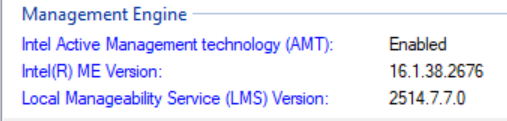
In addition, we can use Intel® Remote Provisioning Client (device-management-toolkit/rpc-go).
| Notes |
Intel® Active Management Technology (AMT) is integrated into the firmware known as the Intel® Management Engine (ME). Intel® AMT version matches the Intel® ME version on a system. |
Steps to get into the MEBx
Starting from Alder Lake platforms with Raptor Lake CPUs running Intel® ME (AMT) 16.1 firmware, remote connections to unsecure TCP/IP port 16992 are no longer supported. TLS port 16993 must be used for connecting to Intel AMT.
Starting from Intel® AMT 19 firmware on Arrow Lake platforms, connecting to Intel® AMT without TLS is not supported at all (local connections must use TLS port). Port 16993 is a requirement.
The device can be accessed using the device’s fully qualified domain name (FQDN) or IP address.
Open a browser and type:
Unsecure
http://<device_fqdn>:16992
http://<device_IP Address>:16992
Secure
https://<device_fqdn>:16993
https://<device_IP Address>:16993