Skip To Main Content
Support Knowledge Base

How to perform Intel BMC Firmware Force Update using Jumper in Intel Server Board M50CYP Family.

Content Type: Troubleshooting   |   Article ID: 000099998   |   Last Reviewed: 04/06/2026

Description

The BMC force update jumper is used to put the BMC in boot recovery mode for a low-level update. It causes the BMC to abort its normal boot process and stay in the boot loader without executing any Linux* code. This jumper should only be used if the BMC firmware has become corrupted and requires reinstallation.

Resolution

Steps to use the BMC force update jumper, perform the following steps:

  1. Turn off the system
  2. Remove the power cord(s).
    NoteIf the BMC FRC UPD jumper is moved with power connected to the system, the BMC will not operate properly.
  3. Remove the system top cover.
  4. Move the “BMC FRC UPD” (J20) jumper from pins 1–2 (default) to pins 2–3 (force update position).
  5. Reinstall the system top cover
  6. Reattach the power cord(s).
  7. Power on the system.
  8. Boot to the EFI shell.
  9. Change directories to the folder containing the update files.
  10. Update the BMC firmware using the following command:
    sysfwupdt.efi -u <filename.bin>
  11. When the update has successfully completed, power off the system.
  12. Remove the power cord(s).
  13. Remove the system top cover.
  14. Move the “BMC FRC UPD” (J20) jumper back to pins 1–2 (default).
  15. Reattach the power cord(s)
  16. Power on the system.
  17. Boot to the EFI shell.
  18. Change directories to the folder containing the update files.
  19. Reinstall the board/system SDR data by running the FRUSDR utility.
  20. After the SDRs have been loaded, reboot the server.

The following image identifies the location of each jumper block on the server board.
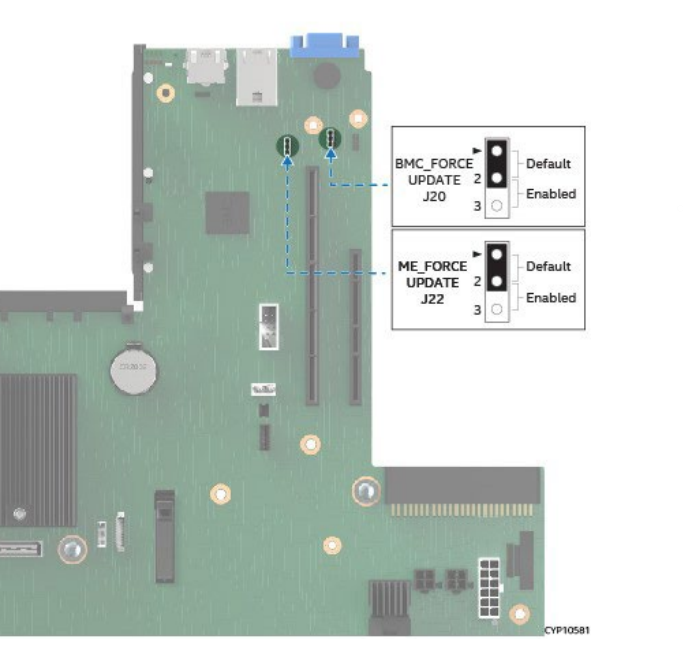
Image of jumper block location

Additional information

For more information, refer to Technical Product Specification for the Intel® Server Board M50CYP2SB Family

Technical Product Specification for the Intel® Server Board M50CYP2SB Family

Related Products

This article applies to 3 products.