What Are the Differences Between vCPU, Core, and Hyperthreading on an Intel® Xeon® Processor?
Content Type: Product Information & Documentation | Article ID: 000098959 | Last Reviewed: 03/03/2026
Intel® Xeon® processors are widely used in data centers and high-performance computing environments due to their exceptional processing power and reliability. Within these processors, three key concepts are often discussed: Cores, Hyperthreading, and vCPUs.
This article will clarify the differences and relationships between these concepts, providing a deeper understanding of how Intel Xeon processors operate and how their resources can be optimized.
Cores
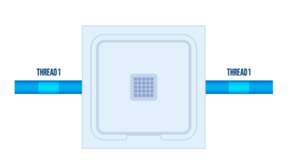
A Core is the primary processing unit within a CPU that executes instructions on an Intel® Xeon® processor. Each core is a separate processing entity capable of running a single thread of execution.
Intel® Xeon® processors feature multiple cores, allowing for the simultaneous execution of multiple tasks. The number of cores in a processor is a key factor in determining its parallel processing capabilities, with more cores generally leading to better performance in heavy, independent workloads.
Hyperthreading
Hyperthreading (HT) is a technology developed by Intel that enables a single core to handle two threads of execution simultaneously on an Intel® Xeon® processor. This is achieved by duplicating certain core components, such as register files, and allowing two threads to share the core's execution resources. Hyperthreading can improve system responsiveness and throughput, especially in multithreaded workloads. When Hyperthreading is enabled, each core can handle two threads, often referred to as "logical processors" or "threads." This technology can increase CPU utilization by approximately 10-30% by allowing a core to run two tasks simultaneously when one is waiting.
vCPUs
A vCPU (Virtual CPU) is a virtual representation of a CPU core or thread on an Intel® Xeon® processor. In virtualized environments, a vCPU is a logical entity that represents a CPU resource allocated to a virtual machine (VM). A vCPU can be mapped to either a physical core or a hyperthread (logical processor) on the host machine. The number of vCPUs allocated to a VM determines how many threads the VM can execute concurrently. Typically, 1 vCPU is equal to 1 Hyperthread (or 1 core if Hyperthreading is off). For instance, a 10-core Intel® Xeon® processor with Hyperthreading enabled (20 threads) can support roughly 20 vCPUs, though these are time-sliced shares rather than dedicated physical cores.
Relationship Between Cores, Hyperthreading, and vCPUs
To illustrate the relationship:
For example, an Intel® Xeon® processor with 8 physical cores and Hyperthreading enabled would have:
Conclusion
In summary, Cores represent the physical processing units, Hyperthreading enables two threads per Core, and vCPUs are virtual representations of CPU resources allocated to virtual machines on an Intel® Xeon® processor. Understanding these concepts is crucial for optimizing the performance of Intel® Xeon® processors in various computing environments.
Whether it's heavy, continuous calculation where physical cores are faster, or scenarios with many I/O operations or web requests where hyperthreading (and thus more vCPUs) allows better concurrent handling, knowing how to utilize these resources can significantly impact system efficiency and productivity.
For more details about Hyperthreading, please visit the article What Is Hyper-Threading? - Intel.