How to Find if Your System is Eligible for Windows 11*
Content Type: Compatibility | Article ID: 000087875 | Last Reviewed: 10/29/2026
Need to determine if a system with Intel® Processor is eligible for installing Windows 11*.
All Intel® Core™ Processors that are 8th Generation and higher support Windows 11*.
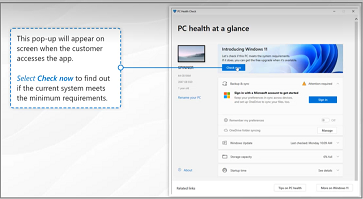
Microsoft enforces specific minimum system requirements for Windows 11 with Intel® Processors. To determine if your system is compatible with Windows 11, use the Microsoft PC Health Check application. If further support is required, please contact Microsoft.
Follow the steps below:
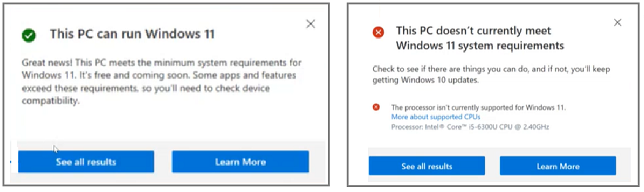
You can see the result, whether or not your system meets the requirements of Windows 11. See below.
| Note | If you have any questions related to the operating system support for your OEM (Original Equipment Manufacturer) PC, contact the OEM for support. If you are building your own system, please contact the vendor of the operating system for support. |