Which Is the PCIe* Port to Plug In My Intel® RAID Controller according to the Number of Processors Installed on the Server?
Content Type: Troubleshooting | Article ID: 000058858 | Last Reviewed: 06/17/2022
Unable to determine which mode and PCIe* port needs to be connected, since the server is not detecting it with one processor configuration
Section named PCIe* Add-in Card Support describes which PCIe* 3.0 is controlled by each processor
Use the PCIe 3.0 Port #5 or #6 since they are handled by CPU #1 and the server will be able to detect the add-in card with one processor installed only.
Use the PCIe 3.0 Port #1 to #4 since they are handled by CPU #2 and the server will be able to detect the add-in card with the two processors installed.
Figure Image to locate the PCIe* ports and its respecting number: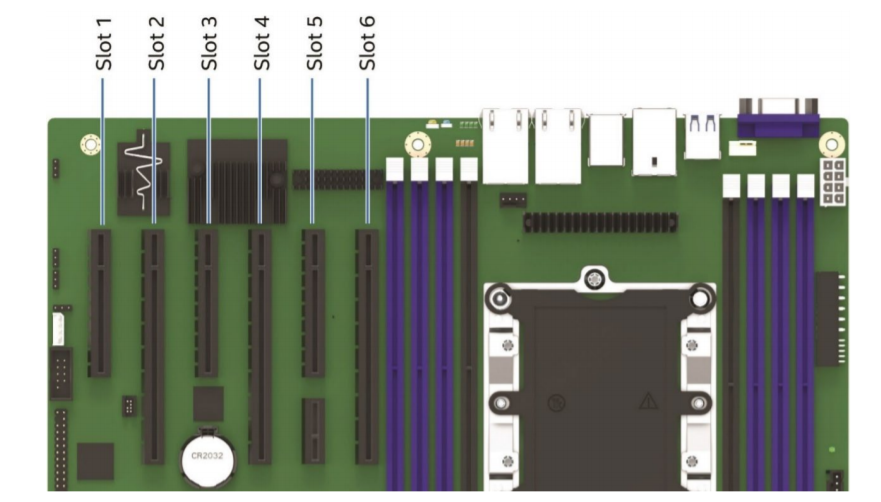
Additionally, section named Riser Card Support
PCIe* slots 2 and 6 are both capable of supporting riser cards. Each x16 riser slot supports standard x16 PCIe* connector Pin-outs, and they also include two 100-Mhz clocks and Riser_ID bits (to provide link width information to the system BIOS). Each of the designated riser slots can support riser cards with the following PCIe* add-in card slot configurations:
| Note | For compatible list of PCIe cards, please refer to Intel S2600ST Product Family Configuration Guide |
Related topic:
S2600STBR Technical Product Specification on section 6.2 "PCIe Add-in Card Support"