How to Create a Bootable USB for OS Installation (UEFI Mode) Without an Optical Drive
Content Type: Install & Setup | Article ID: 000033747 | Last Reviewed: 05/11/2026
System fails to detect USB optical drives during OS installation, preventing boot in UEFI mode. Customers may see "No bootable device found" or similar error messages
Windows installation files exceed FAT32's 4GB file size limit. UEFI systems cannot read NTFS directly, requiring specialized tools like Rufus*.
Follow the steps below to create a bootable USB installation media of a desired OS for UEFI using third party software such as Rufus (Windows* OS used as an example):
Prerequisites: USB flash drive (8GB+), Windows ISO file
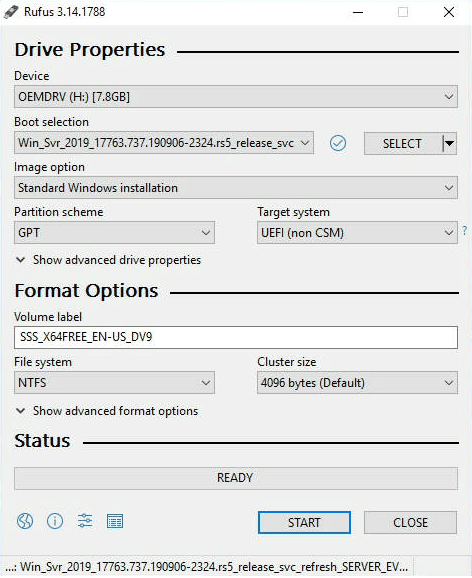
The GUID Partition Table (GPT) was introduced as a part of the Extensible Firmware Interface (EFI) initiative. The GPT provides you with a more flexible mechanism for partitioning disks than the older Master Boot Record (MBR) partitioning scheme that has been common to PCs.