Overview
Steam® is one of the most popular gaming platforms with more than 130 million active users worldwide. Steam was primarily supported on platforms running Windows, Mac OS and Linux, and Google is now working closely with Intel to enable Steam gaming on all high-end Chromebooks product category codenamed Chromebook® Plus[i]. Intel has established relationship with Google across several successful Chromebook offerings over the years in education, corporate and consumer segments, this collaboration is getting extended to Gaming segment as well. The initial roll out of Steam games is already done on Chromebooks with 10th Gen to 13th Gen Intel Core processors and enablement on Intel Core Ultra platforms is in progress. Our work aims to provide better performance for Steam games executed in Virtualized environment in ChromeOS. In this paper, we present the key learnings and performance gains achieved by optimizing the LLC[ii] Allocation between CPU and GPU. Along with the details of cache hierarchy, distribution of different types of caches between CPU and GPU is explained. The paper further discusses about technical details on how we can configure the ratio of allocation for optimizing and tuning the gaming performance. The paper concludes with highlighting key results we have achieved with optimal LLC allocation and steps to use this optimization for different kind of workloads.
Introduction
For faster deployment of Steam gaming engine on Chromebooks and for easier updates, Google has enabled Steam gaming in a ArchLinux VM[iii] solution. Chromebooks already support Android OS, Windows OS, and Debian Linux OS as Virtual Machines in ChromeOS. These VM deployments are sandboxed and hence provide additional security for Applications running in the ChromeOS.
In Arch Linux Virtualized environment (used for running Steam Games), the Gaming workloads performance is comparatively lower than the Native Performance (outside VM environment). In VM environment, the average performance gap was about 20% - 30% on various top Steam game titles compared to Native due to para-virtualized gpu device support.
Our assessment results exhibit that our implementation has achieved 6% - 18% performance in average fps with popular Steam game titles and the overall VM performance gap with Native has reduced by 5%-10% with the above optimization. This optimization serves as a guideline for OS agnostic performance improvements on current and future Intel SoC for different category of workloads.
Technical Background
Borealis[iv] is the Google code name for the VM solution used for running Steam games. Steam on ChromeOS leverages the work that has been done for several years with Crostini and ChromeOS’s virtual machine monitor (VMM) called crosvm[v]. Running Steam and its games within a VM is the best way to deliver on ChromeOS’s goals of speed, security, and simplicity. Having a clear security boundary allows users to keep their data safe. Games aren’t allowed direct access to a user’s files, host GPU, or host kernel. Instead, separation is maintained by VMM which is used for other VM environments as well. This provides another layer of security above normal Linux systems.
Building on Valve’s great work to make games compatible with the Steam Deck, the gaming VM runs a modified version of Arch Linux designed specifically for gaming. This image is automatically kept up to date and updated with each ChromeOS release, ensuring users don’t need to deal with updating drivers or libraries themselves. Steam and all its games are kept within a single VM image; if a user ever needs to uninstall it, they know everything will be removed in a single step, in keeping with ChromeOS’s goal of simplicity.
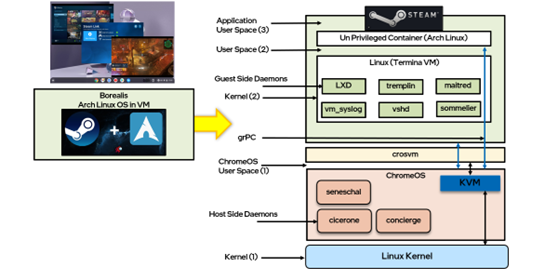
Figure 1: High Level Borealis VM Architecture
As shown in Figure 1, to guarantee high levels of performance, the VM is invisible to the user – from both an operational and a performance perspective. crosvm relies upon the Linux KVM hypervisor and uses para virtualized virtio-based devices instead of emulation. To play the latest Vulkan games, a Venus virtual driver is built; this is a very low overhead Vulkan virtualization driver that offers near-native performance.
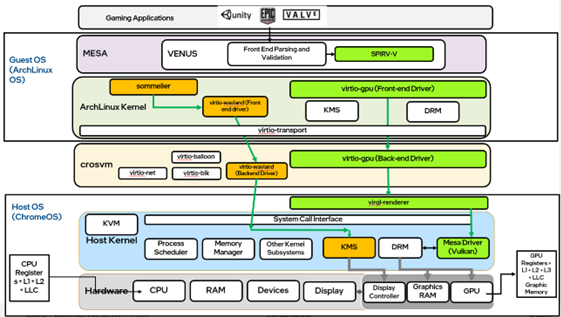
Figure 2:Vulkan Flow in Borealis VM Architecture
As shown in Figure 2, Green coloured flow is the rendering flow which uses para virtualized virtio-gpu[vi] device and orange coloured flow is the display flow using para virtualized virtio Wayland device.
Most of the performance overheads in VM environment are due to para-virtualized transaction between guest and host. One of the optimization proposals to mitigate the overhead is to speed up the GPU execution by allocating more cache.
Details
LLC Allocation Optimization:
Last level cache (LLC) refers to the highest-level cache that is usually shared by all the functional units on the chip (e.g. CPU cores, GPU, IGP, DSP etc.)
As shown in Figure 3, The term can also be used in conjunction with a system whereby the LLC might represent a different hierarchical level of cache depending on the perspective the component in context. In a typical mainstream 13th Gen Intel Core Processor, there are a set of individual cores along with an integrated graphics unit. In those microprocessors, each core has a private L1$ and L2$ and the GPU has its own L1, L2, and L3 cache. Therefore, from the CPU core perspective, the LLC is effectively an L3 cache whereas from the GPU perspective the LLC is a level 4 cache. The architecture is similar for 10th,11th, and 12th Generation Intel® Core™ processors as well.
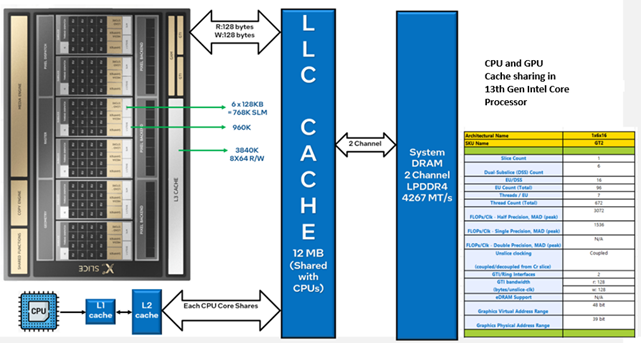
Figure 3: Cache Architecture in 13th Generation Intel® Core™ processors
By default, there is no fixed allocation for Cache between CPU cores and GPU. There are configurable MSRs that can tune the ratio of allocation between CPU and GPU. By optimally configuring the allocation, we obtained significant performance improvements with gaming workloads which are discussed in Results section.
Results
Following are the key results and findings of gaming performance assessments on 12th Generation Intel® Core™ Processors and 13th Generation Intel® Core™ Processors platforms with the optimizations discussed above.
Experiments were conducted by allocating different % of LLC for different CPU and GPU intensive workloads and EMON/EDP data was analyzed for relevant counters. Based on this, CPU 25%: GPU 75% configuration is confirmed to be benefitting majority of the games in terms of min/max/average FPS. As shown in the Table 1 below, 3%-6% gains in average fps were observed.
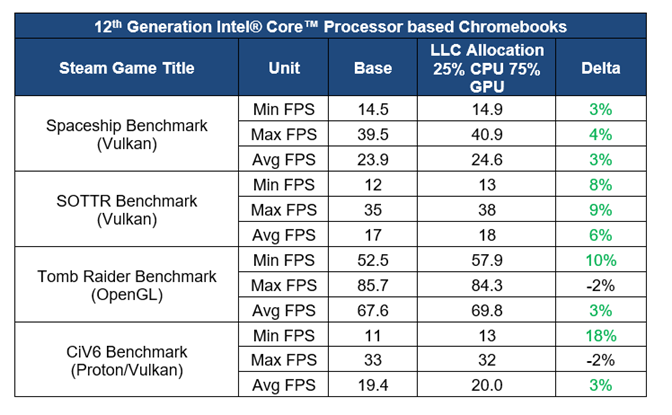
Table 1: 12th Generation Intel® Core™ Processor based Chromebooks Steam Gaming Performance Assessment with LLC allocation optimization
Conclusion
This paper discusses optimizations done for gaming on Chromebook platforms and key learnings. Learnings from these optimizations are shared by emphasizing key performance bottlenecks in Gaming or Graphic intensive workloads. Performance improvement with these optimizations were achieved by leveraging in-depth architectural analysis and profiling conducted on different gaming workloads.
Finally, we presented key results on different Chromebook platforms that serve as potential benefit indicators by incorporating optimizations in these areas. These optimizations should help other teams in Intel to achieve their performance goals on any given OS for different CPU/GPU intensive workloads and can be incorporated in design of current/future Intel SoCs.
These optimizations serve as a guideline that should help in future for Intel PnP and architecture teams to identify bottlenecks early and optimize performance for improved user experience. These optimizations are not limited to GPU or Graphics workloads, but they can be generalized to any kind of workload or prominent use cases from end user perspective.
As part of future plans, the applicability of these optimizations will be assessed on GPU centric AI/ML workloads by assigning more cache to GPU. Also, a method to identify CPU and GPU cache usage dynamically and tuning of LLC allocation ratio is taken up as part of enhancement. Based on the analysis and profiling data points, these optimizations will be further tuned for future generation of Intel SoCs.
Notices and Disclaimers
Tests document performance of components on a particular test, in specific systems. Differences in hardware, software, or configuration will affect actual performance. Consult other sources of information to evaluate performance as you consider your purchase. For more complete information about performance and benchmark results, visit www.intel.com/benchmarks.
Test Configuration
Platform: Brya Chromebook
Software: Google Chrome OS CPFE R121-15680.0.0
Hardware: 12th Generation Intel® Core™ based i7 Chromebooks – 282 CPU Configuration 16 GB RAM
Intel technologies’ features and benefits depend on system configuration and may require enabled hardware, software or service activation. Performance varies depending on system configuration. No computer system can be absolutely secure. Check with your system manufacturer or retailer or learn more at www.intel.com.