|
|
|
About the IP Catalog and Parameter Editor |
The Quartus II GUI helps you easily customize and integrate IP cores into your project. You can use the Quartus II IP Catalog and parameter editor GUIs to select, customize, and generate files representing your custom IP variation.
The IP Catalog (Tools > IP Catalog) automatically displays the IP cores available for your target device. Double-click any IP core name to launch the parameter editor and generate files representing your IP variation. The parameter editor prompts you to specify your IP variation name, optional ports, architecture features, and output file generation options. The parameter editor generates a top-level .qsys or .qip file representing the IP core in your project. Alternatively, you can define an IP variation without an open Quartus II project. When no project is open, select the Device Family directly in IP Catalog to filter IP by device.
The IP Catalog help you quickly locate and select an IP core:
The parameter editor helps you to configure your IP variation ports, parameters, architecture features, and output file generation options.
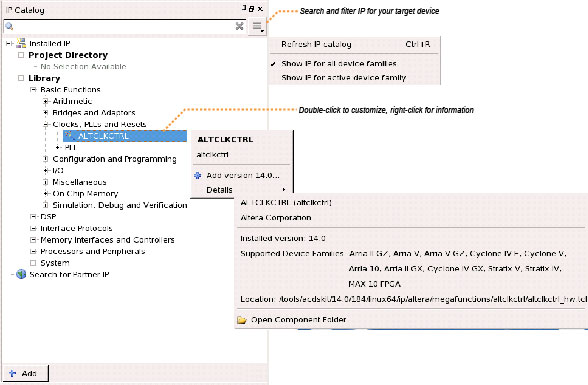
|
Note: The IP Catalog and parameter editor replace the MegaWizard Plug-In Manager in the Quartus II software. A version of the IP Catalog also appears in Qsys. The Qsys IP catalog provides additional system-level IP for Qsys system design. For some IP cores, the Quartus II software may generate messages that refer to the MegaWizard Plug-In Manager. These message are valid if you substitute "IP Catalog and parameter editor" for "MegaWizard Plug-In Manager." |
|
For more information about the IP Catalog and Parameter Editor, refer to Introduction to Altera IP Cores on the Altera website. |


