What is the Intel Server System Guide?
This is your interactive guide in learning the important steps in PLANNING, DEPLOYMENT, and TROUBLESHOOTING an Intel Server System.
It is recommended that you go through each of the navigation links in order. Start by clicking Planning on the tasks menu.
Planning
Planning is the first step.
Follow the flow by clicking the subtask buttons. Click Know the Server to get started with planning.

Know the Server
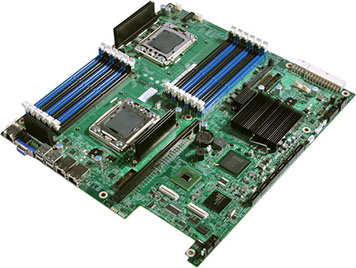
Knowing the product features of the server that you need will definitely help you in deciding which Intel Server System to purchase and build.
|
Focus on the numbered circles to see the component's area and information. |
The product features can help you answer the following questions:
- What processor does it support?
- What memory can be installed?
- How is this server going to be used?
You can find the answers on the Intel® Support website:
- Go to the Intel® Support website.
- Select Server Products from the Choose your product drop-down menu.
- Select Server Boards.
- Select Server Boards.
- Find your product, for example, .
Check What's in the Box
Ensure that the Intel® Server Product you purchase is complete. Check your box contents with the list posted in the Intel® Support website.

- Select Server Products from the Choose your product drop-down menu.
- Select Server Boards.
- Select Server Boards.
- Find your product, for example, .
- Select Product Information and Documentation.
- Click the link that houses the PDF.
- Click the PDF link.
- Refer to the Product Codes & Spare Parts chapter of the PDF.
Configure the Server
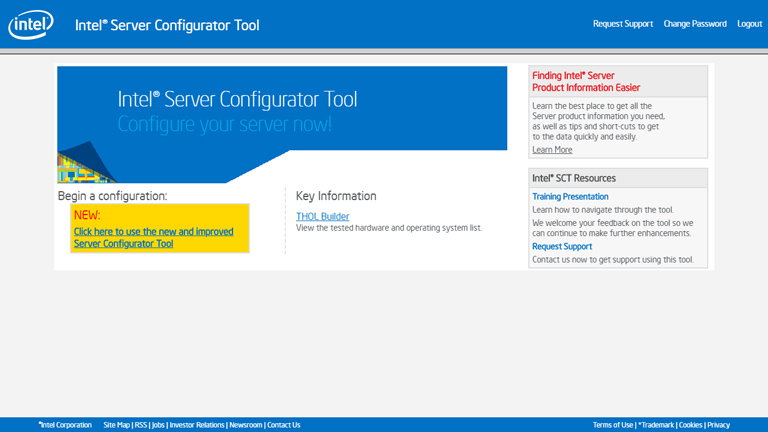
Intel® Server Configurator Tool
The Intel® Server Configurator Tool allows you to quickly and efficiently select compatible components to design a complete Intel® Server System. After configuring, the tool provides a parts list you can print or export to send to your Intel® Authorized Distributor.
You can, however, use the Intel® Server Configurator Tool to simply identify which components are compatible with your desired server.
Intel® Server Configurator Tool Power Budget Tool DownloadWhere to Buy?
After PLANNING for your target Server System and before going into the actual BUILDING of the Server, your next point of interest is where to buy.

Steps to access the list of Intel-authorized resellers:
- Go to the Intel® Technology Provider locator page.
- Select your Language, Country, and City.
- Click go.
- Find the nearest Intel® Technology Provider in your area.
Planning Tools
Suggested utilities and hardware you can use for PLANNING.
| Utility Name | EFI* | Windows* | Linux* | Solaris | DOS | OS Independent |
|---|
Deployment
Deployment is the next step after Planning.
Follow the flow by clicking the subtask buttons. Click Integrate the Server to get started with deployment.

Integrate the Server
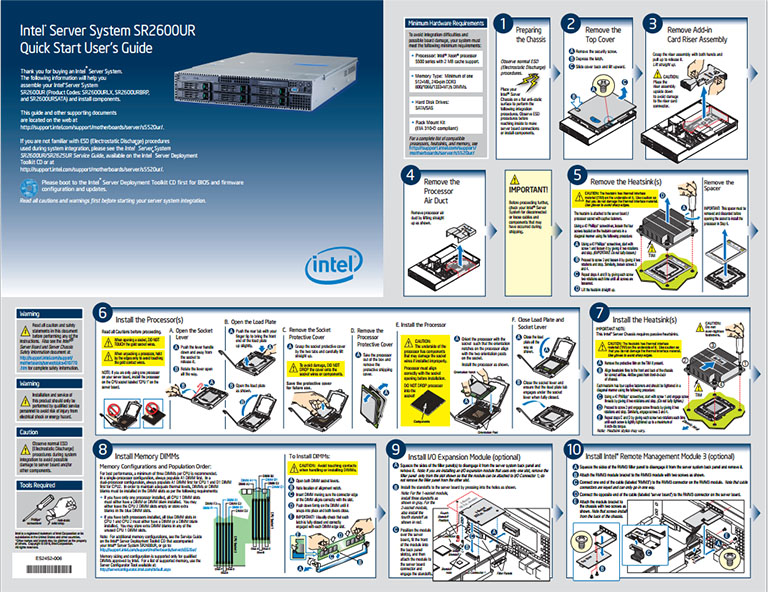
The document enables you to have a quick reference for building the Intel® Server Board with an Intel® Server Chassis.
This document is included in the box as you purchase the chassis, and it is also available for download from the Intel Support website.
Some s have revisions, so it is best to be updated with the latest.
DownloadIntel® Deployment Assistant

Simplify the setup and configuration of Intel® Server Products. Intel® Server Deployment Toolkit is a free deployment application that helps keep servers up to date by locating, comparing, and recommending system updates.
Intel® Deployment Assistant includes technical support documentation, system utilities, drivers, and setup and configuration tools.
Steps to download the Intel® Deployment Assistant:
- Go to the Intel Support website.
- Select Server Products from the Choose your product drop-down menu.
- Select Server Boards.
- Select Server Boards.
- Find your product, for example, .
- Click View all under Drivers and Downloads section.
- Filter Download type by Software Applications.
- Find Intel® Deployment Assistant.
When you purchase the tool, it is included as a CD in the box. The tool is also available for download from the Intel Support website. Because some Intel® Deployment Assistants have revisions, it is best to have the latest one.
Firmware and Drivers
Firmware and Drivers installation may already be covered by the Intel® Deployment Assistant, but just in case you want to install firmware and drivers on your own, you may do so.

Steps to download drivers for your server:
- Go to the Intel Support website.
- Select Server Products from the Choose your product drop-down menu.
- Select Server Boards.
- Select Server Boards.
- Find your product, for example, .
- Refer to the Drivers and Downloads section.
Platform Confidence Test (PCT) Utility
The Intel® Server Board Platform Confidence Test package provides you with a method to determine if an Intel®-based server system is correctly assembled and functioning properly.
Steps to download the Platform Confidence Test:
- Go to the Intel Support website.
- Select Server Products from the Choose your product drop-down menu.
- Select Server Boards.
- Select Server Boards.
- Find your product, for example, .
- Click View all under Drivers and Downloads section.
- Filter Download type by Software Applications.
- Find Platform Confidence Test (PCT) Utility for EFI.
Manage the Server
Intel® Server Management (Hardware and Software)

Intel® System Management Software is a set of management applications, found in a CD included in your box purchase, that lets you view and control hardware (servers, desktops, and laptops) and software (operating systems, applications, and patches) across your network.
Intel® System Management Software includes the following components:
Intel® Active System Console
Built specifically for small business, Intel® Active System Console is a lightweight console that gives you basic server monitoring capabilities including server health and baseboard management controller (BMC) configuration.Standalone utilities from Intel
Includes Intel® Command Line Interface (Intel® CLI) and Intel® SNMP Subagent.
Deployment Tools
Suggested utilities you can use for DEPLOYMENT.
| Utility Name | EFI* | Windows* | Linux* | Solaris | DOS | OS Independent |
|---|
Troubleshooting
Troubleshooting comes after Deployment.
Follow the flow by clicking the subtask buttons. Click FAQs to get started with troubleshooting.

Frequently Asked Questions

Frequently Asked Questions (FAQs) are posted at Intel's Support website.
In case you encounter server issues, browse through the list of FAQs first.
We have made sure to keep this list updated.
Troubleshooting Intel® Server System Boot IssuesHow-To Wizards

How-To Wizards are posted at the Intel Support website.
How-To Wizards are animated shows that illustrate how to do certain procedures. Use the Website Feedback Section to request for topics to convert to How-To Wizards.
Troubleshooting GuideMonthly Specification Update

Intel publishes a Monthly Specification Update. This PDF document communicates product errata and documentation changes and corrections for your server product.
Specification Update WebpageTechnical Advisory
A Technical Advisory is a PDF document that describes a discovered issue, which is specific to a product, with a specific fix or corrective action.

Steps to download the Technical Advisory:
- Go to the Intel Support website.
- Select Server Products from the Choose your product drop-down menu.
- Select Server Boards.
- Select Server Boards.
- Find your product, for example, .
- Select Troubleshooting.
- Look for item labeled as TA-xxxx from the list.
Troubleshooting Tools
Suggested utilities you can use for TROUBLESHOOTING.
| Utility Name | EFI* | Windows* | Linux* | Solaris | DOS | OS Independent |
|---|